Complete components
Headers, plain text and HTML bodies, attachments, and metadata in a structured object.
Open source Python library
mail-parser turns a raw email into a Python object and into JSON: headers, bodies, attachments, the delivery path, and the defects found while parsing. It is the library SpamScope is built on.
The library
Python’s email module gives you the parts of a message. mail-parser adds what an analysis needs next: addresses split into display name and mailbox, Received headers read hop by hop, the MIME tree, and a record of every anomaly, with the original value preserved.
Headers, plain text and HTML bodies, attachments, and metadata in a structured object.
Extract headers, bodies, attachments, and Received hops. Distinguish the display name from the mailbox in From while preserving the original value.
Detect address and MIME structure defects that may hide content or evasion techniques without discarding the raw evidence.
Access Python properties, raw values, and JSON in security and digital forensics workflows.
mail-parser needs Python 3.9 or later and is published on PyPI.
pip install mail-parserThree names to remember: the package is mail-parser, the module you import is mailparser, and the command is mail-parser.
Pick the function that matches where the raw email comes from. They all return the same parsed object.
import mailparser

mail = mailparser.parse_from_file("example.eml")      # path of a raw email
mail = mailparser.parse_from_bytes(raw_bytes)         # bytes
mail = mailparser.parse_from_string(raw_text)         # text already decoded
mail = mailparser.parse_from_file_obj(file_object)    # open file
mail = mailparser.parse_from_file_msg("message.msg")  # Microsoft Outlook
For analysis, prefer a file or bytes: the original bytes and line endings are preserved, and some defects are visible only there.
The examples on this page use one short message, example.eml: an invoice with a PDF attachment, two Received hops, and a From header whose display name looks like an address. Every output below was produced by running mail-parser on it.
Received: from mx.recipient.example (mx.recipient.example [198.51.100.7])
	by mailbox.recipient.example with ESMTP id 4f2a9c
	for <dana@recipient.example>; Mon, 02 Nov 2026 09:15:12 +0000
Received: from smtp.vendor.example (smtp.vendor.example [203.0.113.25])
	by mx.recipient.example with ESMTPS id 7b1d03
	for <dana@recipient.example>; Mon, 02 Nov 2026 09:15:07 +0000
From: billing@trusted.example <billing@vendor.example>
To: Dana <dana@recipient.example>
Subject: Invoice 2026-118
Date: Mon, 02 Nov 2026 09:15:03 +0000
Message-ID: <20261102091503.118@vendor.example>
MIME-Version: 1.0
Content-Type: multipart/mixed; boundary="outer"

--outer
Content-Type: multipart/alternative; boundary="inner"

--inner
Content-Type: text/plain; charset=utf-8

Please find the invoice attached.

--inner
Content-Type: text/html; charset=utf-8

<p>Please find the invoice attached.</p>

--inner--
--outer
Content-Type: application/pdf; name="invoice.pdf"
Content-Disposition: attachment; filename="invoice.pdf"
Content-Transfer-Encoding: base64

JVBERi0xLjQKMSAwIG9iago8PCAvVHlwZSAvQ2F0YWxvZyA+PgplbmRvYmoKdHJhaWxlcgo8PCAvUm9vdCAxIDAgUiA+PgolJUVPRgo=

--outer--
mail = mailparser.parse_from_file("example.eml")
mail.subject # 'Invoice 2026-118'
mail.from_ # [('billing@trusted.example', 'billing@vendor.example')]
mail.to # [('Dana', 'dana@recipient.example')]
mail.date # datetime.datetime(2026, 11, 2, 9, 15, 3, tzinfo=datetime.timezone.utc)
mail.text_plain # ['Please find the invoice attached.\r\n']| Property | What you get |
|---|---|
mail.headers | All headers of the message. |
mail.body | The whole body. mail.text_plain and mail.text_html list the plain text and HTML parts. |
mail.attachments | One entry per attachment: file name, content type, encoding and payload. |
mail.received | The Received headers, one entry per hop. |
mail.defects | The defects found while parsing. |
mail.mime_tree | One entry per MIME part, with its enclosing part. |
mail.mail | The whole parsed message as a dictionary; mail.mail_json is the same as JSON. |
mail.message | The underlying email.message.Message of the Python standard library. |
Each header comes in three forms: the Python value (mail.subject), the original text (mail.subject_raw) and JSON (mail.subject_json).
Attachment file names are chosen by the sender. To save attachments, call mail.write_attachments(directory): it cleans the names and refuses any path that leaves the directory.
A defect is a parsing anomaly worth examining: a malformed header, an ambiguous address, an impossible date, a broken MIME boundary. On its own it does not prove malicious intent. mail-parser records the defect, recovers what can be read safely, and keeps the original value.
In example.eml the display name of From is itself an address. A mail client may show billing@trusted.example, while the mailbox that sent the message is billing@vendor.example.
mail.has_defects         # True
mail.defects_categories  # {'AddressHeaderDefect'}
mail.defects             # [{'address-headers': ['AddressHeaderDefect: from[0]: invalid-display-name']}]
mail.address_header_defects describes each one: the reason, the original value, and the candidates the parser could read.
[
  {
    "reason": "invalid-display-name",
    "raw": "billing@trusted.example <billing@vendor.example>",
    "recovered": true,
    "candidates": [
      {
        "display_name": "billing@trusted.example",
        "address": "billing@vendor.example"
      }
    ],
    "header": "from",
    "occurrence": 0
  }
]
Received headers and dates have lists of their own: mail.received_header_defects and mail.date_header_defects.
render_structure() draws the message on one screen: main headers, the delivery path with the delay of each hop, and the MIME tree with the role the parser gave to each part.
print(mailparser.render_structure(mail))MESSAGE
From: billing@trusted.example <billing@vendor.example>
To: Dana <dana@recipient.example>
Subject: Invoice 2026-118
Date: Mon, 02 Nov 2026 09:15:03 +0000
Message-ID: <20261102091503.118@vendor.example>
Defects: AddressHeaderDefect
DELIVERY PATH
1 2026-11-02T09:15:07+00:00 smtp.vendor.example (smtp.vendor.exa… ──▶ mx.recipient.example ESMTPS
│ +5s
2 2026-11-02T09:15:12+00:00 mx.recipient.example (mx.recipient.e… ──▶ mailbox.recipient.example ESMTP
MIME TREE
0 multipart/mixed [container]
├─ 1 multipart/alternative [container]
│ ├─ 2 text/plain utf-8 35 B [body]
│ └─ 3 text/html utf-8 42 B [body]
└─ 4 application/pdf base64 77 B [attachment] disposition:attachment "invoice.pdf"mail.mime_tree is the same tree as data. Each entry has its position and parent, content type, charset, file name, size, the defects recorded against it, and its roles: container, body or attachment. A part with no role was shown neither as body text nor as an attachment, which is worth a look.
mail.received lists the hops in delivery order, the oldest first. Each entry has the parsed clauses, the date in UTC, and the delay in seconds from the previous hop.
mail.received[1]{'date': 'Mon, 02 Nov 2026 09:15:12 +0000',
'from': 'mx.recipient.example (mx.recipient.example [198.51.100.7])',
'by': 'mailbox.recipient.example',
'with': 'ESMTP',
'id': '4f2a9c',
'for': '<dana@recipient.example>',
'hop': 2,
'date_utc': '2026-11-02T09:15:12+00:00',
'delay': 5.0}mail.get_server_ipaddress(trust="mx.recipient.example") looks for the IP address that delivered the message to a mail server you trust. It returns None when no trusted hop names a public address: older Received headers are written by the sender and are not used as a fallback.
The same analysis without writing Python. The command reads a file with -f, a string with -s, or standard input with -k.
mail-parser -f example.eml -j        # the whole message as JSON
mail-parser -f example.eml -st       # draw the message structure
mail-parser -f example.eml -d -c     # defects and Received hops
cat example.eml | mail-parser -k -j # read from standard input| Option | Output |
|---|---|
-j | The parsed message as JSON. |
-st | The message structure: main headers, delivery path, MIME tree. |
--mime-tree | The MIME tree as JSON. |
-d | The categories of the defects found. |
-c | All Received headers, parsed hop by hop. |
-i SERVER | The sender IP address, given the name of a mail server you trust. |
-r -b -a | Headers, body, attachments. |
-u -m -t | Subject, From, To. |
-p -z | Fingerprints of the message and of its attachments. |
-sa -ap PATH | Save the attachments to a directory. |
-o | Read the file as a Microsoft Outlook message. |
mail-parser -h lists every option.
Analyze raw email messages and their MIME parts.
Convert Outlook files to .eml through an optional backend, then analyze their content.
Outlook support is an optional extra. Install it, then use parse_from_file_msg() or the -o option.
pip install "mail-parser[outlook]"The Docker image runs the same command; everything after the image name is passed to it.
docker run --rm -v ~/mails:/mails:ro fmantuano/spamscope-mail-parser -f /mails/example.eml -jThe rest of the documentation is in the README on GitHub.
From raw to structured
The animation uses a test message from the repository. The excerpt shows how an address-like display name can differ from the mailbox in From. It does not authenticate the sender’s identity.
Try it live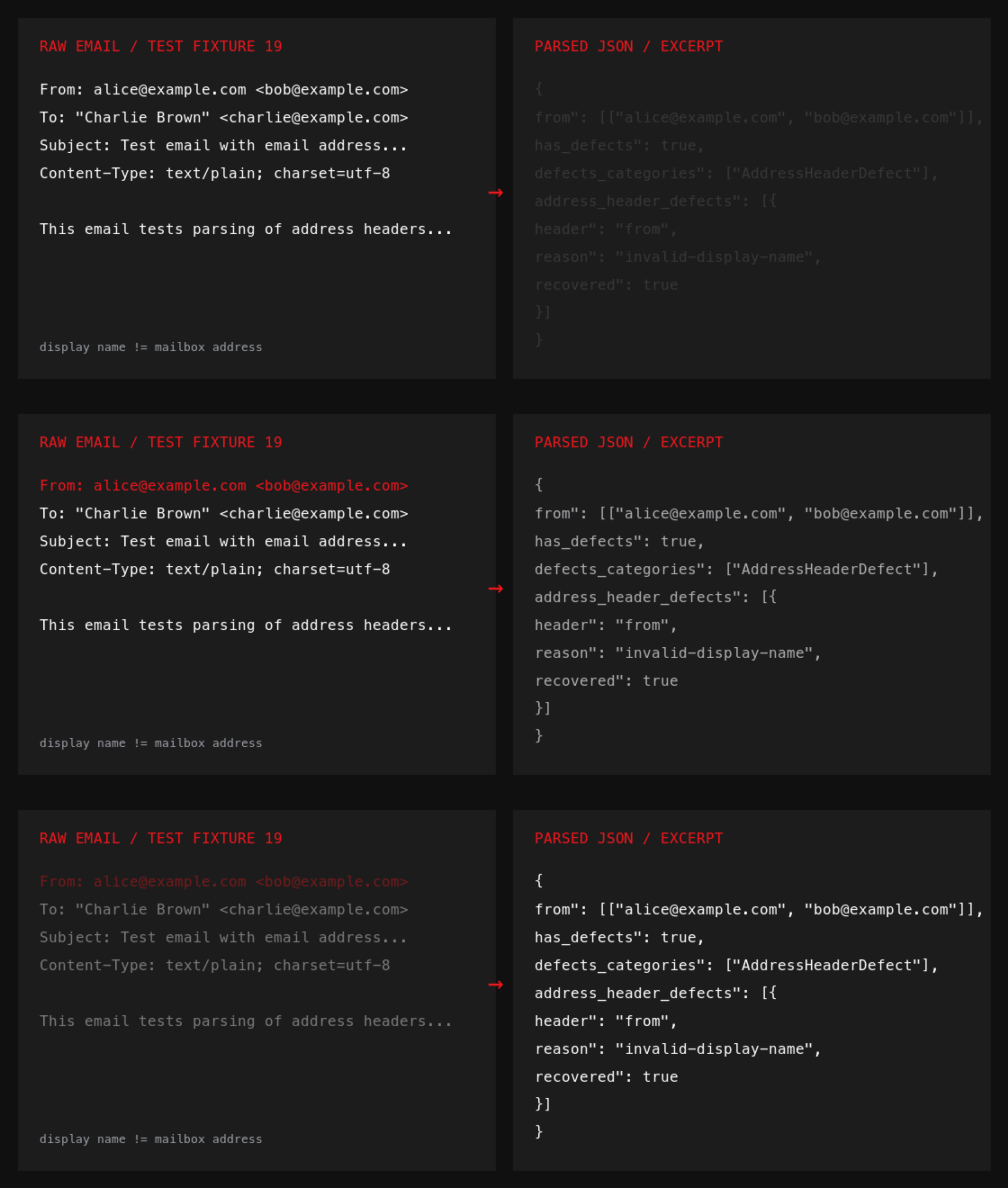
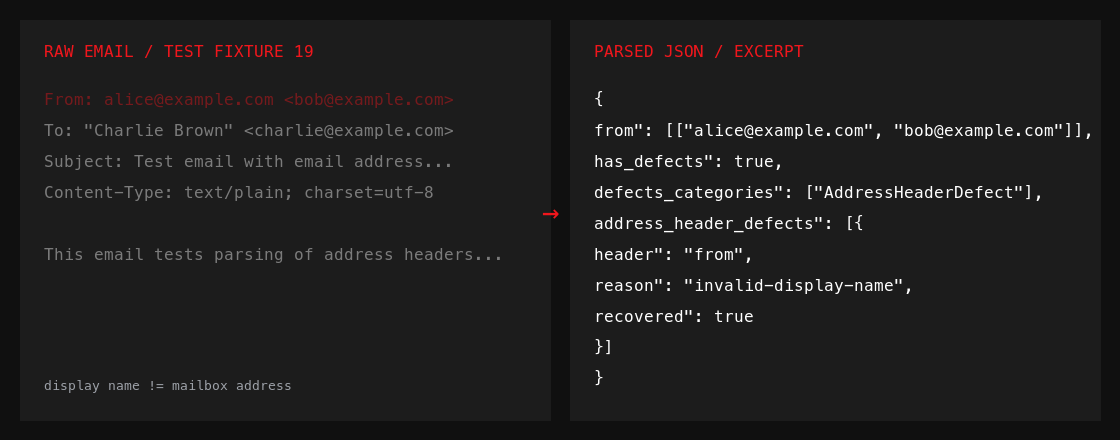
Abbreviated JSON output from the test fixture.
The library appears in distributions and toolkits, is integrated into other tools, and is used in research.
 GitHubSource code repository ↗
 PyPIPython package ↗
 FreeBSDmail/py-mail-parser port ↗
 Arch Linuxmailparser AUR package ↗
 DebianSource package in sid ↗
 REMnuxMalware analysis toolkit ↗
Integrations
Parse Utilities uses mail-parser to extract headers, bodies, and attachments from .eml and .msg files in incident response workflows.
View the integration ↗Research
A study of 2.9 million phishing emails uses mail-parser to extract PDF, image, and calendar invitation attachments from their MIME structure.
Read the study ↗